I was having an animated discussion with a couple of collegues the other day. We were chatting about the relative merrits of OS's, as you do...
Some good points were made by all,including "the iPhone is too expensive for what it is", iOS is not as customisable as other Os's, and "iOS is too locked down, I bought the device, it should be my choice what I run on it"...
Then I said something controversal! I said that there are just two types of OS in the world. There are Windows based OS's or Unix based OS's. I then followed this up with the even more controversial statement, that if you count up every electronic item in your house that uses an operating system and made a nice little table, you would find that devices running Unix based OS's outnumber devices running Windows based OS's.
Devices such as a dell laptop (windows 7), and dreamcast games console (windows CE) are windows based. whareas devices such as Mac laptop (OSX), and Playstation games console are Unix based. Some devices run an embedded OS stored on chips instead of discs. I've not done any detailed research to find out what OS my washing machine runs for instance, but these embedded OS's are usually derrived from freely available Unix varients.
OSX arguably the most advanced OS on the market, was itself based on the free verion of BSD called freeBSD, which was itself based on the original Unix.
As a side note, many people don't know what OS their devices are running. I met an extreme Windows fan while on holiday, who insisted that he would never think about using any computer that didn't use windows. I had to point out to him (sorry couldn't resist it) that his phone (a pocket computer after all) was running Android, a mobile version of Unix ;)
So here is a little chart I made showing the devices I have (minus the washing machine), and the type of OS that runs on them. I wonder what other people's charts would look like?
A friendly blog designed to help Windows, Mac and Linux users setup, configure and improve their setup. Information for the OS curious, for those that want to find out how the 'other half live'. Every user can benefit from each other, be they Mac, Linux or Windows users.
Sunday, February 27, 2011
Sunday, March 21, 2010
Computers, computers everywhere!
We have lots of computers in the house, using a lot of differnt OS's. This isn't an accident, it is carefully designed that way. At last count (including smartphones) there are probably 6 computers!
A sony laptop (Windows 7, PCLOS, Linux Mint), a Macbook (OSX Snow Leopard, Windows 7), an iMac (OSX, Windows 7), two iPhones and a Blackberry, oh and I almost forgot - an Aspire One netbook running Linpus linux. On our network we also have an Apple Time Capsule, which is a wonderful automated backup server, a router, an N wireless access point, file server, and print server. The Time capsule is plugged into our Netgear router and G wifi access point.
Now, if we had a house full of Macs things would be rediculously easy. To set up a Mac to backup and print you simply need to choose Time Machine from System Preferences and turn it on, if you are wired or wirelessly connected it just sets itself up, just turn it on! Similarly with wired and wireless shared printing, just go to 'Printers' and connect to the printer, the correct drivers are downloaded, installed and kept up to date automatically. Even the current level of ink is displayed when connecting to the printer wirelessly from the Macbook.
This is truely 'zero configuration' which Apple calls 'bonjour'
However, there are lots of other computers in the house running OS's other than OSX. Can they use the Apple server for backup, files, and remote printing?
I can see the Time capsule on the network using the other computers, and was able to browse files but I was never able to set it up to print. I must admit I struggled with Linux for a while until I saw an error message that said something along the lines of 'I can't see the printer, install CUPS server'. Silly me, CUPS stands for 'Common Unix Printing System'. If Linux had no CUPS server, how could it find the printer? I was getting confused about adding a server to a client to connect to the server.
Using linux mint this was already installed, but not enabled. I simply had to click on printer configuration, and turn on CUPS, doh! Then it just worked just like the Mac. I had to give myself a good slap at this point as I had been messing around typing in complex server strings including port numbers, and I didn't need to do any of that.
Next up was Windows, which again I'd never been able to set up to print. I discovered the problem though, which was due to me wanting the Apple airport software for Windows to work in a specific way. It wouldn't. So the solution was to let the software do what it wanted to, then it worked flawlessly with the printer.
Both the Macs and the Linux machines allow us to remotely print without waking up the server so that it spins up its hard disks, they simply link to network servies and only activate the service needed when it is used. Windows on the other hand has to fully wake up the server in order to mount a drive and mount the printer, the server goes to sleep again after a few minutes , but trying to get Windows to not do this seems impossible.
However, the good news is that I can now watch video from any computer or OS in the house, the iMac and Macbook do wired and wireless hourly backups without the user even noticing using Time machine, Windows, Linux and OSX can all print wirelessly and files can be easily shared between computers. Huzzah!
A sony laptop (Windows 7, PCLOS, Linux Mint), a Macbook (OSX Snow Leopard, Windows 7), an iMac (OSX, Windows 7), two iPhones and a Blackberry, oh and I almost forgot - an Aspire One netbook running Linpus linux. On our network we also have an Apple Time Capsule, which is a wonderful automated backup server, a router, an N wireless access point, file server, and print server. The Time capsule is plugged into our Netgear router and G wifi access point.
Now, if we had a house full of Macs things would be rediculously easy. To set up a Mac to backup and print you simply need to choose Time Machine from System Preferences and turn it on, if you are wired or wirelessly connected it just sets itself up, just turn it on! Similarly with wired and wireless shared printing, just go to 'Printers' and connect to the printer, the correct drivers are downloaded, installed and kept up to date automatically. Even the current level of ink is displayed when connecting to the printer wirelessly from the Macbook.
This is truely 'zero configuration' which Apple calls 'bonjour'
However, there are lots of other computers in the house running OS's other than OSX. Can they use the Apple server for backup, files, and remote printing?
I can see the Time capsule on the network using the other computers, and was able to browse files but I was never able to set it up to print. I must admit I struggled with Linux for a while until I saw an error message that said something along the lines of 'I can't see the printer, install CUPS server'. Silly me, CUPS stands for 'Common Unix Printing System'. If Linux had no CUPS server, how could it find the printer? I was getting confused about adding a server to a client to connect to the server.
Using linux mint this was already installed, but not enabled. I simply had to click on printer configuration, and turn on CUPS, doh! Then it just worked just like the Mac. I had to give myself a good slap at this point as I had been messing around typing in complex server strings including port numbers, and I didn't need to do any of that.
Next up was Windows, which again I'd never been able to set up to print. I discovered the problem though, which was due to me wanting the Apple airport software for Windows to work in a specific way. It wouldn't. So the solution was to let the software do what it wanted to, then it worked flawlessly with the printer.
Both the Macs and the Linux machines allow us to remotely print without waking up the server so that it spins up its hard disks, they simply link to network servies and only activate the service needed when it is used. Windows on the other hand has to fully wake up the server in order to mount a drive and mount the printer, the server goes to sleep again after a few minutes , but trying to get Windows to not do this seems impossible.
However, the good news is that I can now watch video from any computer or OS in the house, the iMac and Macbook do wired and wireless hourly backups without the user even noticing using Time machine, Windows, Linux and OSX can all print wirelessly and files can be easily shared between computers. Huzzah!
Note to self!
I've been exceptionally busy / lazy over the last few months. I've neglected my blogs / facebooking and twittering, keeping up with this social networking malarky is actually quite time consuming.
So now that I've caught up with my podcasts, edited my bookmarks (which had gotten out of control-actually I'm still doing this), facebooked, twittered, sorted email folders (why don't I just use search instead?), I think I can write a blog post or two.
You wait ages for a blog entry, then two come along at once. Typical!
So now that I've caught up with my podcasts, edited my bookmarks (which had gotten out of control-actually I'm still doing this), facebooked, twittered, sorted email folders (why don't I just use search instead?), I think I can write a blog post or two.
You wait ages for a blog entry, then two come along at once. Typical!
Saturday, February 13, 2010
What does Apple's latest iThing mean for education?
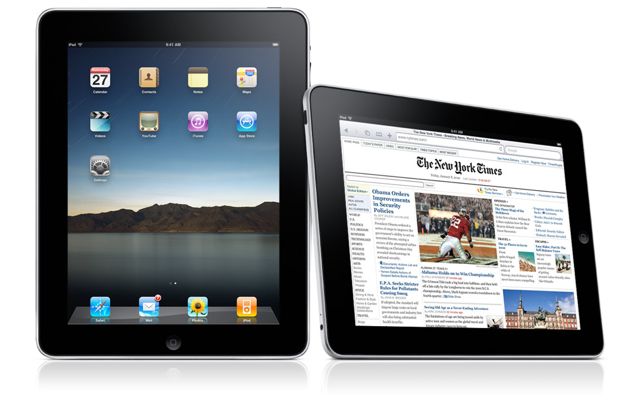
Whilst Apple are certainly not the first to enter into the tablet market, it's iPad could make a significant impact within education. The word tablet is often used to describe a mobile computer with a keyboard and a rotating screen which can fold back on itself. Mobile devices like Apple's iPad are described as a 'slates'. In fact Rich has certainly been ahead of the curve as he has been using pen based slate systems from Motion Computing for years!
So what specific advantages does the Apple iPad have to offer eduction?

Accessing iTunesU on the iPhone

Medical and Educational apps for iPhone
So, what don't I like about the Apple iPad?
I think the iPad is crying out for a camera. In fact I think it needs 2 cameras, in a front and rear facing design. The front facing 'iSight' camera could be used for Video conferencing using Skype and iChat, with the rear camera used for mapping and augmented reality. Alas the iPad has a distinct lack of cameras ;/
Lack of flash support. Although this might be seen as a severe problem now, the industry may be moving towards HTML5 and web streaming technologies that do not use flash. This could mean this is not as serious an omission as first thought. Using YouTube will not be a problem as it is available in app form, just like on the iPhone. For instance when I click on YouTube content from the Facebook app on my iPhone, the YouTube app launches and plays the video. When I have finished watching the YouTube video, the facebook app launches and takes me back to where I was. I can see flash support working in the same way on the iPad if flash was to appear as an app.
The iPad is single user. I don't like the seaming inability to log into the iPad so it can be easily shared between multiple users. I was hoping that an iSight camera would use face recognition to log each user in.
I would have preferred GPS in every model. It would be good to see the 3G enabled iPad models cheaper, and the wifi models scrapped. While the wifi models will be able to display your location using wifi access points, GPS would allow more accurate use of Google Maps.
There are a few minor negative points about the iPad, but they are far outweighed by enormous potential for the platform. With the trends in mobile and cloud use sky-rocketing, I believe the iPad can only be a success!
Gizmodo has some excellent Slate information
BBC focus magazine iRex iLiad Book Edition £449, winner of the best current ebook reader.
Whilst Apple are certainly not the first to enter into the tablet market, it's iPad could make a significant impact within education. The word tablet is often used to describe a mobile computer with a keyboard and a rotating screen which can fold back on itself. Mobile devices like Apple's iPad are described as a 'slates'. In fact Rich has certainly been ahead of the curve as he has been using pen based slate systems from Motion Computing for years!
So what specific advantages does the Apple iPad have to offer eduction?
- The OS does not have to be installed by the University
- It boots in 15 seconds from solid state storage
- Users can update their OS without IT department help or affecting set-up
- It is immune to virus attack
- The student would have direct access to iTunesU, which has already been embraced by many top Universities such as The Open University, Birmingham City University, The University of Edinburgh, Oxford University, Cambridge University, and many more!
- Library material could be delivered directly to the student
- Book publishers will be offering course-books as digital downloads
- Students can manage their educational digital lives, subscribing to University feeds and podcasts
- The iPad could be used to present work, and run full 'keynote' and 'powerpoint' presentations
- Like the iPod/iPhone, the iPad should provide Microsoft exchange email, calendaring and contacts services
- The student could make use of fast wifi 802.11n connections across campus
- Students could carry all of their course-books and research with them, the iPad weighs only 1.5 pounds
- With 10 hours usage and 1 month standby, it can last all day on one charge and be easily charged via USB.
- Students can make use of Wikis and Blogs and collaborate with each other
- The iPad is an iPod, web browser, feed reader, ebook reader and more it only costs $499 / £319
- There are no media players, codecs or drivers to install and maintain. It just works.
- Rich and varied educational apps are available for the iPad from the app store, especially in the field of medicine
- It is almost perfect for exploring the GeoWeb and mapping services across campus
- Computer science students can use a freely available software development kit learning to code their own applications
- Many languages are supported through an enhanced software keyboard
- It is intuitive, reliable and easy to use
Accessing iTunesU on the iPhone
Medical and Educational apps for iPhone
So, what don't I like about the Apple iPad?
I think the iPad is crying out for a camera. In fact I think it needs 2 cameras, in a front and rear facing design. The front facing 'iSight' camera could be used for Video conferencing using Skype and iChat, with the rear camera used for mapping and augmented reality. Alas the iPad has a distinct lack of cameras ;/
Lack of flash support. Although this might be seen as a severe problem now, the industry may be moving towards HTML5 and web streaming technologies that do not use flash. This could mean this is not as serious an omission as first thought. Using YouTube will not be a problem as it is available in app form, just like on the iPhone. For instance when I click on YouTube content from the Facebook app on my iPhone, the YouTube app launches and plays the video. When I have finished watching the YouTube video, the facebook app launches and takes me back to where I was. I can see flash support working in the same way on the iPad if flash was to appear as an app.
The iPad is single user. I don't like the seaming inability to log into the iPad so it can be easily shared between multiple users. I was hoping that an iSight camera would use face recognition to log each user in.
I would have preferred GPS in every model. It would be good to see the 3G enabled iPad models cheaper, and the wifi models scrapped. While the wifi models will be able to display your location using wifi access points, GPS would allow more accurate use of Google Maps.
There are a few minor negative points about the iPad, but they are far outweighed by enormous potential for the platform. With the trends in mobile and cloud use sky-rocketing, I believe the iPad can only be a success!
Gizmodo has some excellent Slate information
BBC focus magazine iRex iLiad Book Edition £449, winner of the best current ebook reader.
Saturday, December 5, 2009
Great Mac like volume control for Windows
Having a lack of drivers for those extended buttons on my Sony Vaio laptop, I discovered a fantasticly useful application for Windows. It's called simply 3RVX, it allows you to set hotkey combinations to control volume. Such quality freeware!
Sunday, October 25, 2009
Microsoft not compatible with Microsoft?
Microsoft live mail, part of Microsoft Live Essentials offers no support for getting your email, calendars and contacts from exchange 2007!
Not only am I shocked that Windows 7 comes with no email client out of the box, but it isn't even compatible with its own company's mail, calandaring and contacts solution. On my Mac it takes just a couple of clicks to set up exchange support for Apple mail, iCal and Address book all of which are available out of the box. Even Linux in its Ubuntu form comes with evolution mail supporting exchange mail, calendars and contacts.
Further more, isn't the clue in the name? Windows live essentials, i.e. essential apps, i.e. a bloody email client! So in an attempt to slim down Windows 7 which is admittedly much slimmer than Vista but nowhere near as slim as OSX or Ubuntu, Microsoft have chosen to axe essential apps resulting in a much poorer out of box experience.
I like Windows 7, it is certainly the best Windows yet with much to commend. But this just shows that the words 'joined up thinking' and 'Microsoft' cannot be used in the same sentence!
Not only am I shocked that Windows 7 comes with no email client out of the box, but it isn't even compatible with its own company's mail, calandaring and contacts solution. On my Mac it takes just a couple of clicks to set up exchange support for Apple mail, iCal and Address book all of which are available out of the box. Even Linux in its Ubuntu form comes with evolution mail supporting exchange mail, calendars and contacts.
Further more, isn't the clue in the name? Windows live essentials, i.e. essential apps, i.e. a bloody email client! So in an attempt to slim down Windows 7 which is admittedly much slimmer than Vista but nowhere near as slim as OSX or Ubuntu, Microsoft have chosen to axe essential apps resulting in a much poorer out of box experience.
I like Windows 7, it is certainly the best Windows yet with much to commend. But this just shows that the words 'joined up thinking' and 'Microsoft' cannot be used in the same sentence!
Monday, October 19, 2009
Microsoft Security Essentials
Although I have not yet thrown live viruses at Microsoft's new security essentials virus protection software, initial results have been very good indeed. Microsoft Security Essentials takes only a small amount of memory whilst running, system and file scanning is fast, real-time protection uses minimal system resources, and it has a very efficient virus definitions update process.
I have replaced AVG (free) with Microsoft security essentials and have noticed a big improvement in the speed and responsiveness of the system. So much so, that my aging Sony Vaio with 1gb of RAM has suddenly become a very usable system running Windows 7 and Microsoft security essentials.
Now to set up a walled garden virtual machine environment, and throw some viruses at it to see if anything sticks. If the results are good I can see little point PC sellers pushing the majority of customers to buy 3rd party security suites which generally cripple the computers they run on. Although I doubt that will stop them trying.
I have replaced AVG (free) with Microsoft security essentials and have noticed a big improvement in the speed and responsiveness of the system. So much so, that my aging Sony Vaio with 1gb of RAM has suddenly become a very usable system running Windows 7 and Microsoft security essentials.
Now to set up a walled garden virtual machine environment, and throw some viruses at it to see if anything sticks. If the results are good I can see little point PC sellers pushing the majority of customers to buy 3rd party security suites which generally cripple the computers they run on. Although I doubt that will stop them trying.
Subscribe to:
Posts (Atom)